Guide
How to Download and Export Amazon Product Reviews
Download or export Amazon product reviews by ASIN, product set, or keyword to CSV, Excel, JSON, JSONL, or Parquet for product and competitor research.
By AMZShark Editorial Team · Published · Updated
To download Amazon product reviews with AMZShark, create a Product Search from one or more ASINs, filter the available review rows, open the Export menu, and choose CSV, Excel, JSON, JSONL, or Parquet. You can also export a single product directly from its product-detail page or export reviews found by a Keyword Search.
Can Amazon download product reviews natively?
Amazon Seller Central provides tools for viewing customer reviews and working with customer feedback, but a seller looking for a reusable row-level CSV of product review text may need a separate export workflow. Our guide to exporting Amazon product reviews from Seller Central covers the official-tool distinction in more detail. Do not confuse three different data sources:
- Product reviews discuss a product's features, quality, fit, durability, and customer experience.
- Seller feedback concerns the seller, fulfillment, service, shipping, or an order.
- Voice of the Customer and Customer Feedback insights summarize customer-experience signals and topics but are not necessarily a raw review-text export.
Amazon changes Seller Central features over time. Check the current Amazon Customer Reviews tool for official capabilities, then use AMZShark when you need searchable, exportable review rows for a defined product set.
Step 1: choose the products you want to study
Start with the smallest product scope that can answer your question. For a single listing, use its ASIN. For competitor research, collect the ASINs for direct competitors, adjacent products, and important variations. AMZShark Product Searches accept up to 1,000 unique ASINs in one search.
An ASIN is the ten-character product identifier shown on Amazon product pages. You can paste one ASIN per line or separate ASINs with commas or spaces. AMZShark can also build a product set from Amazon search results or from products already known to its database. For a large catalog, use the dedicated bulk ASIN export workflow.
Step 2: create a Product Search
- Create or sign in to your AMZShark account.
- Open Product Searches and choose a new search source.
- Name the search so the export will be recognizable later.
- Select one Amazon marketplace. Products in a saved search belong to that marketplace.
- Paste the ASINs, enter an Amazon search query, or search the AMZShark product database.
- Save the search and open its Reviews page when review rows are available.
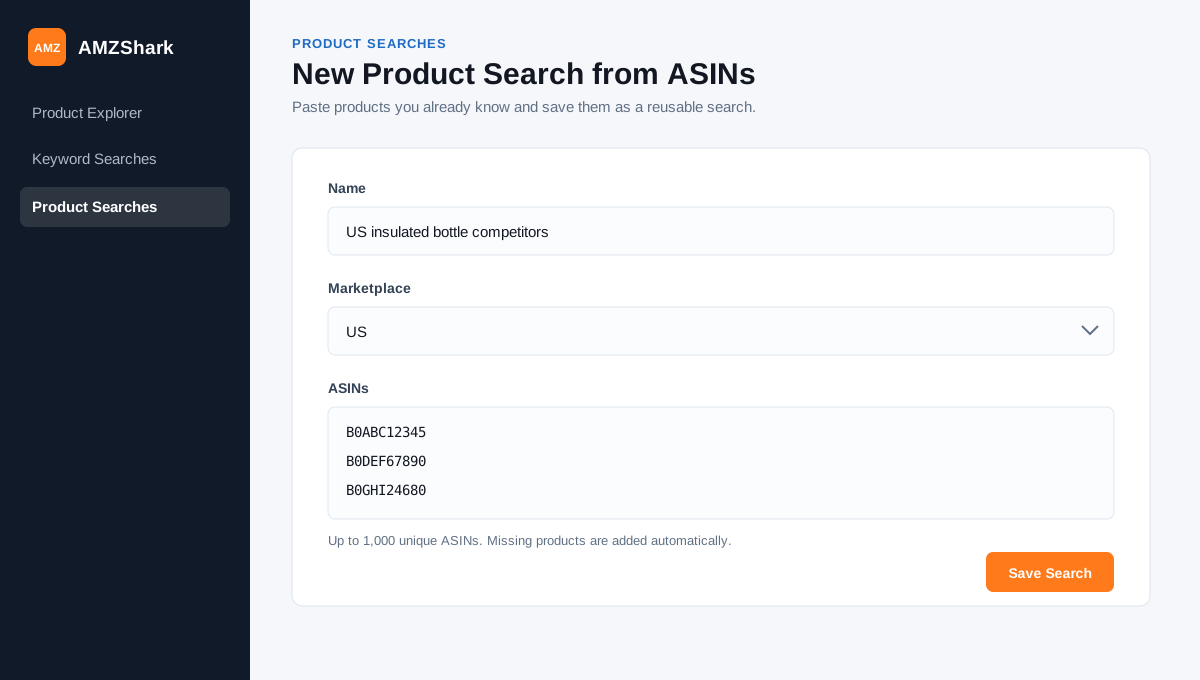
Use separate product searches when the business question or marketplace differs. A tightly named search such as “US insulated bottle competitors” is more reusable than an unstructured list of unrelated ASINs.
Step 3: filter the review rows
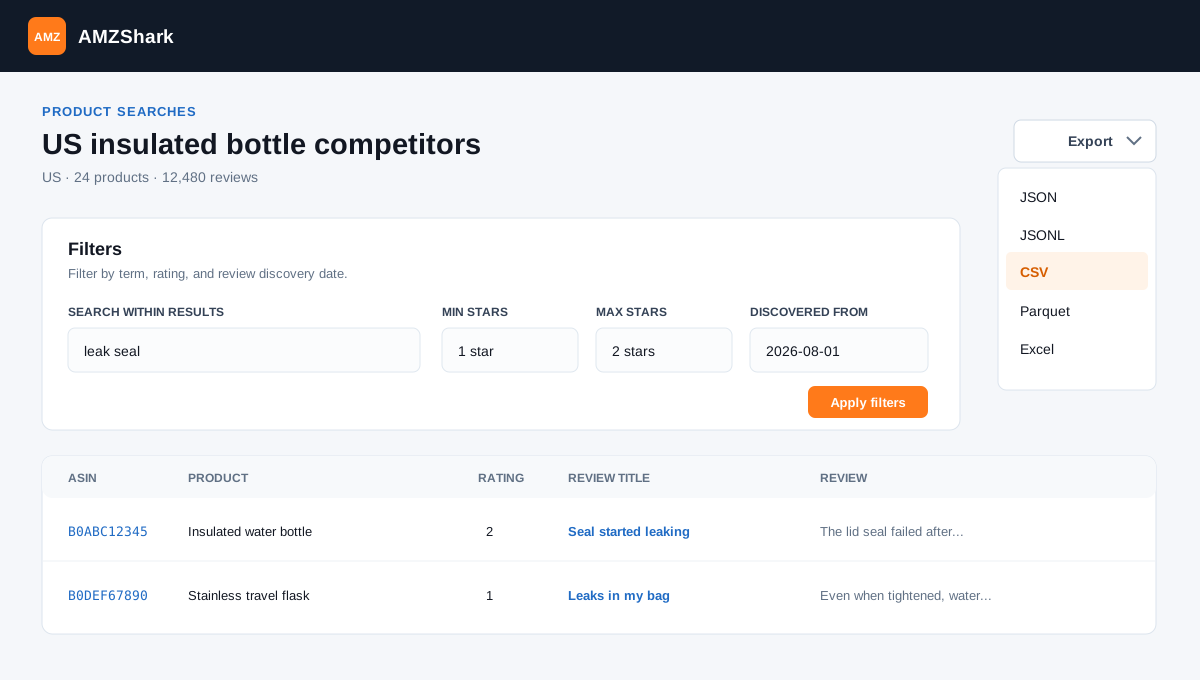
The Reviews page lets you search within product titles, review titles, and review text. You can also set minimum and maximum star ratings and limit rows by the date AMZShark discovered them.
- Use one to two stars for defect, return-risk, and expectation-gap research.
- Use four to five stars for benefit language, use cases, and purchase triggers.
- Search phrases such as “too small,” “stopped working,” “easy to clean,” or category-specific materials.
- Use discovery-date windows to create repeatable snapshots or split very large exports.
The discovery date is when AMZShark found the review in its dataset. It should not be interpreted as the exact date the customer originally posted the review.
Step 4: export the reviews
Keep the filters you want applied, open the Export menu, and select a format. The downloaded filename includes the search name, active text or rating filters, and the selected date range so the file remains identifiable after it leaves AMZShark.
| Format | Best for |
|---|---|
| CSV | Excel, Google Sheets, pivot tables, sharing, and simple data tools. |
| Excel (.xlsx) | Opening a formatted workbook directly in Microsoft Excel. |
| JSON | Applications that expect one structured JSON array. |
| JSONL | Data pipelines, command-line processing, and one-object-per-line ingestion. |
| Parquet | Analytical warehouses, Arrow-compatible tools, and compact columnar storage. |
Exports are capped at 500,000 rows. If a result set exceeds that limit, apply narrower discovery-date windows and export each window separately.
What fields are included?
The current product and keyword review exports contain the following columns:
| Field | Meaning |
|---|---|
| asin | The Amazon product identifier attached to the review. |
| country_code | The Amazon marketplace country code. |
| product_title | The product title known to AMZShark. |
| review_url | A source link for the review when available. |
| review_rating | The one-to-five-star rating. |
| date_discovered | The date the review entered the AMZShark dataset. |
| reviewer_url | The reviewer profile URL when available. |
| reviewer_name | The displayed reviewer name or a missing-name label. |
| review_title | The review headline. |
| review_text | The review body available in the dataset. |
Verified-purchase status, helpful-vote counts, Vine status, customer media, and exact customer-posted timestamps are not current export fields. Do not build an analysis that assumes those columns exist.
Single-product, bulk, and keyword exports
Use a product-detail export when one ASIN is the complete scope. Use a Product Search for a reusable group of one to 1,000 ASINs. Use a Keyword Search when the research begins with buyer language and you want review rows matching a term across products. The same five output formats are available across these workflows.
Use downloaded reviews responsibly
Review text is customer-authored content. Keep source URLs and product context, limit use to a legitimate research purpose, avoid republishing reviews as your own marketing claims, and review Amazon's current Community Guidelines and any terms that apply to your account and intended use. If data will be shared with an AI service or outside your organization, remove fields you do not need and follow your privacy and data-governance requirements.
Frequently asked questions
Can I export multiple Amazon products at once?
Yes. Create a Product Search with up to 1,000 ASINs from one marketplace, then export the filtered review rows as one file.
Can I download Amazon reviews to Excel?
Yes. Choose Excel from the Export menu for an .xlsx file, or choose CSV and open it in Excel or Google Sheets.
Does the export contain every Amazon review?
No completeness guarantee is made. The export contains the reviews available to the selected AMZShark product or keyword search and filters.
Can I export only negative reviews?
Yes. Set the maximum rating to one, two, or three stars before exporting. The active rating filters are carried into the export.
Can I export only reviews mentioning a phrase?
Yes. Search within the saved review results, apply any star and discovery-date filters, then export.
Ready to work with Amazon review rows instead of copying them by hand?
Create a free AMZShark account